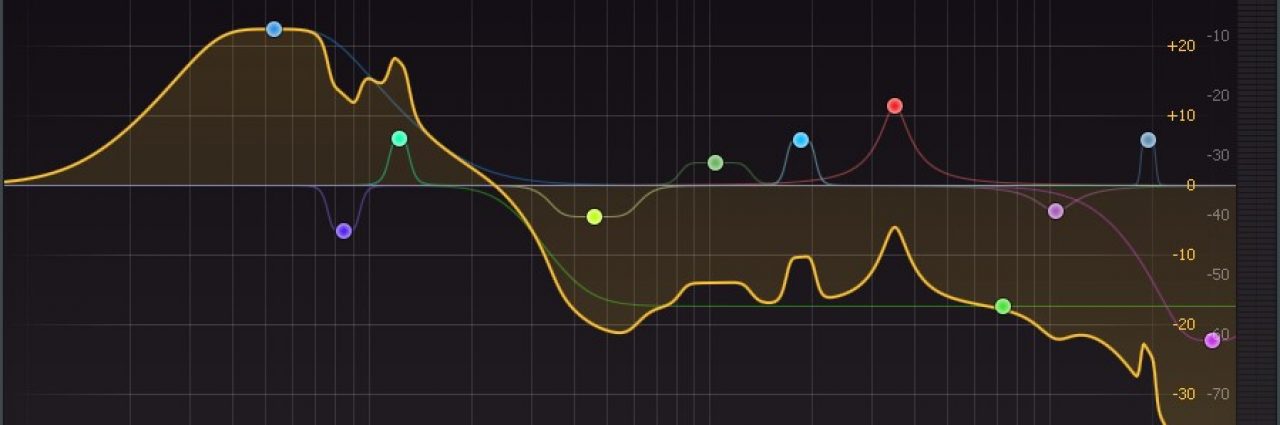

Using a reference track when mastering is a kind of standard practice, but it can be done much better with the wonderful EQ matching functions found on so many equalizer plugins. Here’s what I’ve tried and how it’s worked out for me.
Last updated: 10-July-2023
Equalizers That Match
I use both the Tokyo Dawn EQs and Fabfilter’s Pro-Q (version 3 at this time), but other manufacturers are including an EQ Match function in their plugins. What the EQ Match function does is match the equalization of your track to a reference. The reference can be either side-chained (most matching EQs) or a stored spectrum (Fabfilter Pro-Q and Tokyo Dawn EQs) or a music file like mp3 or wave (Tokyo Dawn EQs). If you apply the required equalization from the analysis, what you end up with is your track sounding remarkably similar in tone to the reference track.
Here is a good article by Sage Audio comparing a couple of EQ-matching plugins (Fabfilter Pro-Q and Izotope Ozone): https://www.sageaudio.com/blog/audio-plugins/what-is-the-best-plugin-for-eq-matching.php
Fabfilter Pro-Q[#]
Here are some videos of the Fabfilter Pro-Q EQ showing how the matching function works.
Tokyo Dawn’s Slick EQ, Slick EQ M, and Nova EQ
This is the EQ that I prefer for numerous reasons and below are some videos of how it works.
The EQ match on this set of EQs is a part of “smart operations” and each has even more than just an EQ match capability. Check it out. I think these are far superior to Fabfilter or Ozone in both matching capability and EQ sound in general, in my opinion:
Newfangled Audio’s EQuivocate
I like the idea of EQuivocate and how it matches. In my workflow, I tried to incorporate it, but it just does not show me enough about what I am doing. I need to both hear and see the spectrum, and it is more based on hearing so it doesn’t work well for me. Also, the bands are not always appropriate for my music. Of course, you can change these bands, but that is an extra step and time-consuming, so I favor the Tokyo Dawn EQs for the speed of workflow. Below are some videos showing how EQuivocate works.
Where to Use EQ Match
Reproducing a particular sound or duplicating a song:
I have done this on whole songs such as when I was trying to replicate the sound of Biosphere’s Shenzhou and I have done this when trying to replicate a certain noise or sound found within a song such as when I did this with Susumu Yokota’s Saku noise. I used Fabfilter Pro-Q for those instances because it is very surgical and precise in the number of filters it suggests, and it gets it right on the money for reproducing sounds.
Use: Fabfilter Pro-Q
By using Fabfilter Pro-Q for replicating Shenzhou, my EQ curves looked like the one below and made it sound exactly the same as the original source material. Exactly the same. Incredible.

Replicating the background noise in a track also was easy using just pink noise and Pro-Q. Here is how the EQ curve looked for replication of the background noise in Susumu Yokota’s Saku track:

I can also use the Tokyo Dawn Slick EQs to get a similar result by using their matching function and setting it at 100%. However there are not as many points available as in the Fabfilter version, so the result may not be as exact.
Mastering my own tracks using references:
When mastering my own tracks, I want to get the right “flavor” of sound but not necessarily reproduce another exactly. Creating my own tracks, after all, is a creative process and I want full creative control over them. But I also like a good suggestion. And, I don’t want to contact actual people or rely on anyone else’s opinion, so I rely on a suggestion from my favorite equalizer plugins and tweak them to suit my ears.
Use: Tokyo Dawn SlickEQ Master
Then I use SlickEQ Mastering Edition for the suggested levels against either pink noise, grey noise, or a reference track of a similar type and genre. I make sure that up to this point in my master chain I have all the effects of saturation, compression, equalization, etc., all included before I make the SlickEQ Mastering Edition EQ do that matching.
Next, I choose a reference source for the matching. I either use pink noise, grey noise, or a track.
Pink Noise Reference
Why use pink noise as a reference? It has a human-friendly response where it loses energy as the frequency goes upward (as opposed to white noise that does not). It is a good starting point for any set of tracks and can help bind them all together in an album release. There are several articles out there about it.
Generally speaking, pink noise is considered to be more soothing than grey noise. Pink noise has a more balanced mix of frequencies, with the lower frequencies being more prominent, which can create a calming effect. Grey noise, on the other hand, has a more uneven mix of frequencies, so it can be more jarring and less calming. Additionally, pink noise is more similar to the sound of nature, such as rainfall or wind, which can make it even more soothing. I make primarily ambient music, so I like the idea of something soothing to match against.
I use matching to pink noise as my default mode of reference matching on my master bus and for most of my tracks. It is o.k. if used properly and that means not going too low or too high with the reference. These are relative, but the Special Ops section of Slick EQ-M usually does not pick something too low or high of a range.
A lot of times I make single tracks that sound completely different from one another when combined in an album. This is not what I want, so I use the EQ Match function with a pink noise reference to give them all the same kind of tone while retaining their individual unique sounds.
Pink noise has a downward slope when you look at the frequencies from low to high, and this approximates the Fletcher Munson curves of hearing. It should have about a 3dB downward slope.
But, know your EQ and its tilt because this distorts the view. Maybe pink noise does not show a downward slope and that could be because, as is the case in Fabfilter Pro-Q, the default tilt is 4.5 dB/octave. This makes it have an upward slope. Or, in TDR EQs, pink noise appears as a straight line, not tilting downward or upward, and that is because the TDR EQs have a 3dB/octave equal energy weighting applied to the curves shown. Here is a video showing how the different types of noise look in these EQs. Read the description of the video on YouTube to know more:
With the Tokyo Dawn EQs (and SlickEQ Mastering Edition in particular), I often use pink noise as my reference source because it is not genre-specific. I have not found other matching EQ products that provide the pink noise as a reference, so I recommend the Tokyo Dawn (TDR) EQs for this matching type. While you can do it with others, it saves a step and saves time when using the Tokyo Dawn EQs.
In the SlickEQ Mastering Edition, I set the match range knob at 30%, using my ears as a guide. But this 30% might be too much or too little, depending on your situation. In mine, I have an inflator and limiter immediately after it, and they amplify the harmonic content significantly, so I need about 30% on my range of the SlickEQ-M, but yours may be different.
I will adjust my upstream equalizers to get the curve in SlickEQ-M close to the pink noise reference without much change needed in the SlickEQ-M. This helps me mix and helps me tune my ear to what balance there should be.
Check out the great explanation of the Fletcher Munson Curves and EQ in the video below because this is how your ears hear.
But, again, keep in mind to know your EQ and how the curves are weighted or tilted.
Below is the section of SmartOps in TDR EQs that deals with reference matching to pink noise:
Grey Noise Reference
Another reference source can be “grey noise” which is a noise that more closely matches the equal loudness, Fletcher-Munson curves. If I use grey noise as a reference, I can extend down into the lower frequencies and up to the highest. I think grey noise as a reference can be very valuable if done right, but I have better luck with using the pink noise internal reference of SlickEQ-M and set the range to 15% with the lower and upper frequencies wherever
But you really don’t want your music to sound equally loud everywhere as the grey noise tends to make it. This gives too much bass and treble and a scooped-out middle.
I get my grey noise reference signal at -12 dB from wavtones.com.
I can do better with the internal pink noise reference if I watch my low end.
Pink noise is preferred over grey noise for music EQ matching because it has a more balanced mix of frequencies, with the lower frequencies being more prominent, which can create a calming effect. In contrast, grey noise has a more uneven mix of frequencies, making it more jarring and less calming. Additionally, pink noise is often used to test the frequency response of communication systems because many musical and natural sounds have spectra that decrease in intensity at high frequencies. Furthermore, pink noise can be EQ’d to give a different response to work with, and even matched to an average frequency response from a track that you like using a ‘match EQ.’ While grey noise is an option, it may not be as effective as pink noise for music EQ matching due to its uneven frequency mix.
Comparison of Noise References
Boulez’s Debussy performance is well-made. I used this as a subject for my mixing to a noise reference and tried it against the pink noise and grey noise references.
First, the original:
Next, I used TDR Slick EQ-M to generate an adjustment EQ curve for it using pink noise as a reference:

Then, I used a grey noise reference:

Genre References
Gregory Scott from Kush Audio has a good video about reference mixing, which is essentially what you are doing when EQ matching, in my opinion:
If I want to get the tone of a certain type of music, I will choose a track from that genre and use it as my matching EQ reference.
I try to choose the reference to be similar to my track. I want to use a classical reference for classical music, an electronic reference for electronic music, etc. But a lot can be done by breaking these rules, such as using a hip-hop reference to equalize classical music, and you can end up with a whole new and creative sound.
I tend to have better luck with pink noise as a reference because it is rare that I have a genre reference that closely matches what my music sounds like. More effort is required with the genre references because of this. I find myself tweaking the sound afterward much more when I use genre reference material. But, it also opens some creative doors for me as well because I often get unexpected sounds.
In Fabfilter Pro-Q, I have recorded the spectrum of some of my favorite reference tracks and have saved them for future use when EQ-matching tracks. In the Tokyo Dawn EQs, I don’t need to do this but instead can import the music files (wave, mp3, etc.) at the time of matching, and this saves incredible amounts of time. So, for this reason, I would recommend the Tokyo Dawn (TDR) EQs.
How I Choose Reference Tracks
I choose reference tracks that sound best to my ears. It is that simple and will be different for everybody.
I like a good low end with crystal clear highs for most of my classical music or orchestral work. I find this range of tones in Pierre Boulez’s recording, where he conducts the Cleveland Orchestra in DeBussy’s works. It sounds airy and clear but with good bass.
Another is Tord Gustavsen’s music from his album, The Other Side.
Here are some more:
Each of these is for a different type of music, but they all have qualities that I like.
You can also search Spotify or other streaming services for “Reference Tracks” and find playlists of audiophile-quality mastered tracks. This could suit your needs as well. In any case, it is interesting to do.
I have to choose reference tracks that are as close as possible to the music that I am making, or else I end up with something that sounds awful.
Sonible
Sonible makes great products for matching levels across genres or reference tracks, so I use their plugins almost exclusively right now for mixing and mastering.
Phase and EQs
Always keep an eye on the phase. It can mess up the sound and the perceived equalization. The key word here is “can” and not “will.” Dan Worrall has good videos about it:
Signals in parallel can cancel each other out so it is something to watch out for.
Tokyo Dawn’s Nova and Slick EQ M EQs are parallel EQs. These two work well on the master bus and do not introduce issues for me. The creator of these EQs has discussed how they are made, and it is worth checking out.
Clariphonic is a parallel EQ, and it works so well it is stunning. I often use it on the master bus but also on instrument tracks as well because it can pull out the great tone from lifeless instruments.
You can always use a linear type of equalization (available in Fabfilter Pro-Q and others), but you run the risk of pre-ringing.
The phase response is responsible for the tone of an EQ, which is primarily why each EQ will sound a bit different from another. Linear phase equalization ruins transients because it causes phase shift but then cancels the shift by applying the same process earlier in time, combining the two in the end. This combination restores the phase shift, but in the process, you get pre-ringing or pre-echo. This pre-ring/echo stuff messes up the transients. You end up with a worse tone, in my opinion.
I favor the parallel type of equalizer found in the Tokyo Dawn equalizer products and the Kush Audio Clariphonic. Once you’ve tried these, you may never go back to any of the others.
Sonnox Claro and Dynamic EQ plugins are also of high quality and do not seem to present a phase issue. I would highly recommend these as well.
Summary
So to summarize, there are a few instances I can think of, in general, where you could use EQ-match:
- Make exactly the same sound by using a reference track that is exactly what you are trying to duplicate. Check my Biosphere example, and my Susumu Yokoto example. Fabfilter Pro-Q[x] is good for this.
- Make your music sound similar to a reference track of the same type or genre. For example, if you are making a classical piano piece, then the reference would be from a classical piano performance that you think sounds good and would like to emulate. Fabfilter Pro-Q[x] works for this, but it takes longer using Fabfilter than it does the Tokyo Dawn EQ products.
- Make your track sound similar to the rest of your tracks or another of your tracks. This would be for album continuity, for example, where you want all tracks to have a similar tonal character. You would select one as your reference and match the rest to it – preferably pink noise. Tokyo Dawn (TDR) EQs are good for this.
- Creatively use EQ matching to make a track of one genre sound like another. For example, use a hip-hop reference track while making a classical piano track, so the classical piano takes on the character of the hip-hop genre reference. Either Fabfilter or Tokyo Dawn products can be used here.
- Match the reference spectrum of pink or grey noise as a generic way of making well-balanced mixes.
Of course, there’s way more to make a track sound good outside of the equalization. There’s a whole host of things, including balance, width, reverb, delay, compression, saturation, and the list goes on and on. But, you can get a surprisingly long way by using just equalization (EQ).
References
Interview with Fabian Schivre from Tokyo Dawn
Additional interview with Fabian Schivre from Tokyo Dawn
Another Interview with Fabian from Tokyo Dawn
One response to “Using EQ Matching and References to Create Great-Sounding Tracks”
[…] EQ Matching to Commercial […]